
Record a receipt or a payment against bills
A customer pays at the shop or by UPI. Record the receipt from your phone, settle the right bills, and the outstanding list is right after the next backup.
Before you start
- An owner or manager account.
- The shop computer on, with Tally open.
-
Step 1: Start a receipt or payment
Tap New, then Receipt for money in or Payment for money out.
-
Step 2: Choose the party, account and amount
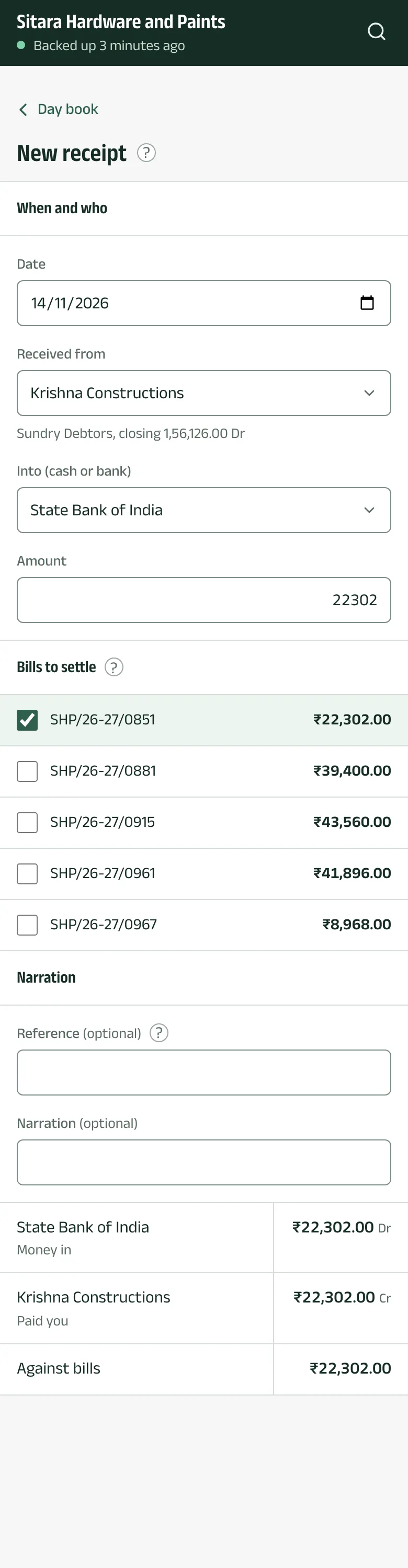
For a receipt, choose who it is Received from and the account it went Into (cash or bank); for a payment, who it is Paid to and the account it came From (cash or bank). Under Bills to settle, tick the open bills it pays, so Tally keeps the bill-wise balance right, and check the Amount.
-
Step 3: Review and send to Tally
Tap Review, check it, and Send to Tally. Aruvu says Saved in Tally once Tally accepts it.
The pictures show Sitara Hardware and Paints, an invented shop. Its customers, suppliers and figures are made up.